Specific Days
The Specific Days option is used when the instructions indicate the medication must be taken on a specific day of the week, such as on a Sunday or Wednesday only.
To set up specific days:
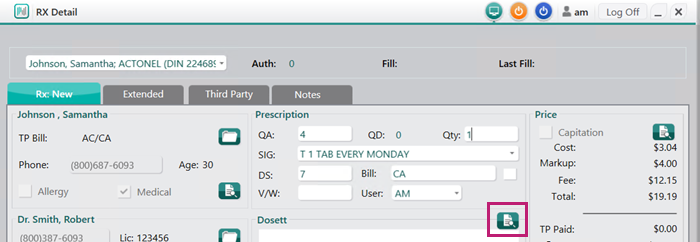
- In the Rx tab of Rx Detail, select the magnifying icon in the Dosett section.
The Administration Details window opens. - In the Administration Details window, enter the following information.
- Select the specific day of the week the medication must be taken on.
- In the Start Date field, enter the date that the patient will start to take the medication.
This is the date the patient started the medication, not the current prescription. This will carry over to all subsequent refills of the prescription chain.
Note: If the medication start date is unknown, select the first ingestion date for the compliance pack being billed.
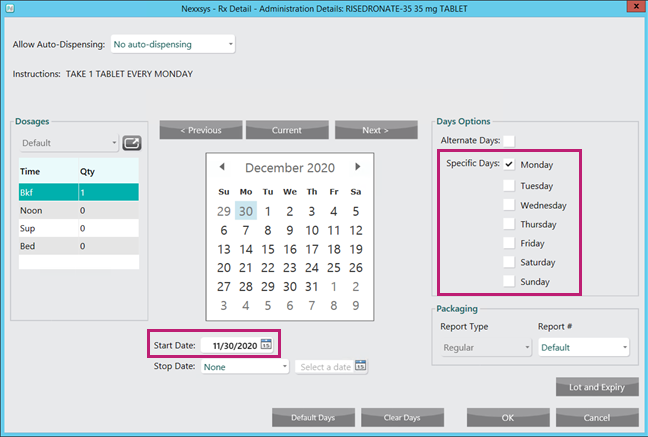
The selected calendar days will update accordingly to the options selected above and the days supply entered in Rx Detail.
- Select OK. The Administration Details window closes to the Rx Detail window.
- Continue to process the prescription as usual.
Changes made in the Administration Details window will carry forward to any refills or reauthorizations in the prescription chain.
Prescription Hardcopy
If printing a hardcopy for the prescription, the Rx Calendar Pattern and Rx Admin Times (Dose) entered in the Administration Details window prints.
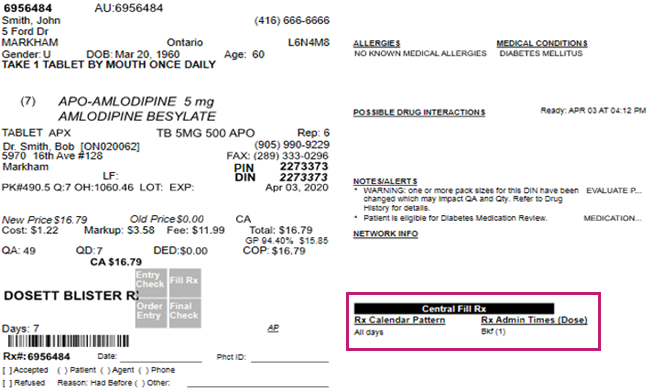
Note: If the prescription is flagged for Central Fill, this information also displays here.